 Automotive
 Industrial materials
 Packaging
 CMMS/EAM
 MES
MES
 Connected Worker
 Manufacturing Intelligence
 Maintenance
 Continuous Improvement
 Operations
 IT
IT
 Executive Leadership
 Case studies
 Blog
Blog
 Ebooks & Guides
 Webinars
 Events
.svg) OEE Calculator
OEE Calculator
 Downtime Cost Calculator
 About Us
 Partners
 Newsroom
 Support
 Careers
 Trust center


.svg)

Welcome to the October 2026 edition of Shift Change, your monthly report on product updates, feature enhancements, and innovations across L2L.
This month marks our biggest milestone yet: the launch of Shop Floor Execution, L2L’s flagship platform for Connected Manufacturing Operations, powered by Execution AI.
Engineered to replace fragmented plant software, Shop Floor Execution consolidates core capabilities across Maintenance, Production, Digital Work, Workforce & Skills, Manufacturing Intelligence, and Shop Floor Connectivity into a single AI-powered system of action. It converts real-time operational data into active frontline guidance, empowering manufacturers to meet demand, protect margins, and repeat operational success across every shift, line, and plant.
Below, we explore the new Shop Floor Execution and the new capabilities that you’ll only be able to access through this enhanced platform. We’ll follow with this month’s latest release updates across automated workflow dispatches, smart skills compliance, maintenance planning, component failure tracking, and machine-first navigation.
Shop Floor Execution: The AI-Powered System of Action for Connected Manufacturing Operations
As L2L’s unified operational platform, Shop Floor Execution serves as the launchpad for our most advanced Execution AI capabilities. By upgrading to the enhanced platform, you get access to these new capabilities detailed below. Shop Floor Execution unlocks embedded intelligence directly within daily shift workflows to bring real-time, AI-guided execution directly to frontline teams.
AI-Assisted Voice Dispatch Creation (Shop Floor Execution Only)
Creating a detailed dispatch no longer requires stopping to type out descriptions on a touchscreen or terminal. Operators can now use voice recording in the "New Dispatch" modal to describe an issue in their own words. Execution AI automatically transcribes the audio and populates required dispatch fields in real time. Additionally, when interacting with Execution AI Chat, operators can convert any Solver’s recommended action directly into a draft dispatch with a single click.
What this means for you: Hands-free reporting on the shop floor. Operators spend less time manually typing and more time executing, keeping line disruptions short while capturing higher-quality problem descriptions from the start.
Machine Dashboard Recommended Actions (Shop Floor Execution Only)
Maintenance and operations teams can now view AI-generated Recommended Actions previewed directly on the Machine Dashboard page. Based on historical breakdown and runtime data for that specific asset, Execution AI surfaces immediate troubleshooting suggestions. Users can click "Learn More" to launch a full Machine Analysis Solver directly inside the Execution AI Chat interface.
What this means for you: Instant breakdown context. Maintenance technicians receive AI-driven troubleshooting recommendations based on historical machine data before even touching physical equipment, drastically cutting diagnostic downtime.
Out-of-the-Box AI Workflows: Shift Handover & Maintenance Planning (Shop Floor Execution Only)
Beyond voice dispatches and asset health, Shop Floor Execution unlocks pre-configured AI workflows that eliminate manual prompt writing:
-
Line Pulse Check & Shift Handover: Generate instant line-health summaries for stand-up meetings or auto-trigger shift handover reports 15 minutes before shift change so oncoming teams step onto the floor fully aligned.
-
AI Draft Planning in Maintenance Planner: Schedulers can let Execution AI build an initial draft maintenance schedule in seconds while accounting for trade skills, resource availability, and plant constraints.
-
Automated PM & Checklist Creation: Convert raw equipment manuals (even 40-page PDFs) or AI troubleshooting recommendations directly into structured draft PMs and checklists for rapid supervisor review.
What this means for you: Hours saved on administrative prep. Shift leads and maintenance schedulers eliminate manual report compilation and schedule building, which lets them spend more time on continuous improvement.
Why Upgrade to Shop Floor Execution?
- Turn Plant Data into Instant Action: Shop Floor Execution moves your operations beyond static, passive dashboards. By embedding closed-loop Execution AI directly into daily shift workflows, your team gets real-time, prescriptive guidance that protects margins and drives consistent execution across every shift.
- Zero Risk, 100% Continuity: Shop Floor Execution layers seamlessly over your existing L2L setup and broader IT ecosystem (ERP, MES, PLCs) with zero "rip-and-replace." You retain 100% of your current site configurations, custom workflows, user permissions, and historical data.
- Immediate Time-to-Value (Bundled AI & Analytics): Every Shop Floor Execution upgrade comes with dedicated enablement services, including two custom Execution AI Solvers and two tailored Analytics Dashboards configured directly around your facility's core KPIs.
- Future-Proof Your Shop Floor: Shop Floor Execution is L2L’s foundation for continuous innovation. Upgrading ensures your plants gain immediate access to all future Execution AI innovations, pre-built solvers, and advanced automation releases as they launch, keeping your operations adaptable and ahead of changing shop floor demands.
General Product Enhancements: Driving Plant Efficiency
Beyond the launch of Shop Floor Execution, we’ve shipped powerful updates across L2L modules to deliver immediate value, automated workflows, and usability improvements for all existing users.
Actionable Dispatch Questions: Automate Workflow Creation
Manual handoffs between departments often lead to delayed resolutions or missed follow-ups. With Actionable Dispatch Questions, system-driven workflows take over the moment an operator or technician answers a dispatch question. Admins can now configure automated follow-up actions directly within dispatch question logic. When a specific answer is selected, such as a quality check failure or a safety hazard flag, L2L automatically creates and routes the corresponding follow-up dispatch in real time.
What this means for you: System-enforced escalation without manual handoffs. Critical safety, quality, or maintenance events automatically trigger follow-up dispatches across every shift, eliminating reliance on operators to remember secondary logging.
Checklist APIs: Automate Checklist Data Capture
Checklists are how the shop floor records inspections, readings, and condition checks. Until now, that data had to be typed into L2L by hand, even when another system already had it. With the new Checklist APIs, your external systems can launch a checklist from a published template, submit answers to an open checklist and close it in the same step, or launch and complete a checklist in a single call. Sensor and telemetry readings can now go straight into L2L checklists and are saved just as if they were entered in L2L. Full endpoint details are in the L2L API documentation.
What this means for you: Less double entry, more reliable data. Readings your systems already capture go into L2L automatically, which reduces transcription errors and gives maintenance teams a complete record to analyze and act on.
Maintenance Planner: Smarter Navigation & Past Due Work Visibility
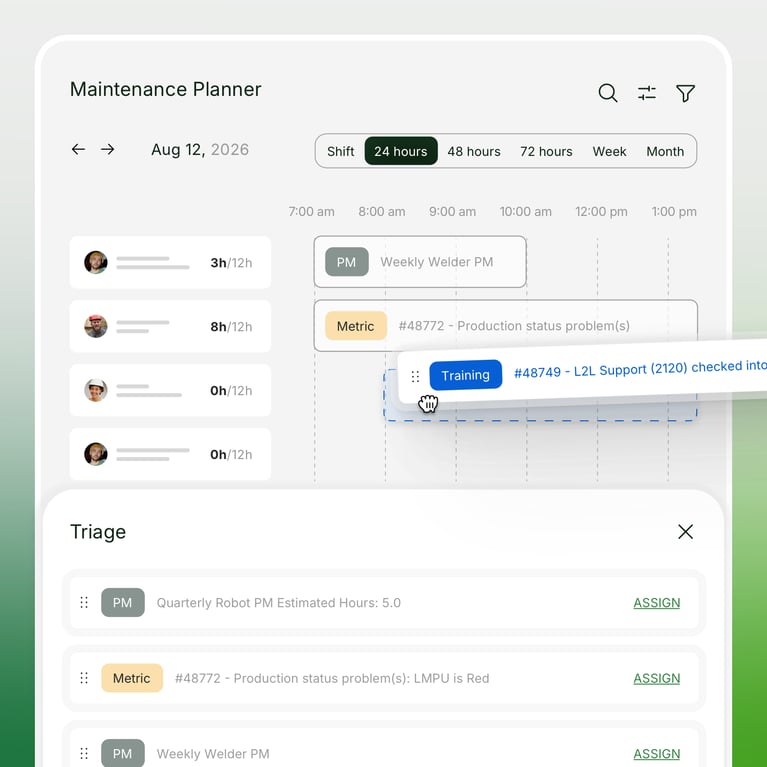
Building on our recent Maintenance Planner upgrades, we’ve introduced several enhancements designed to make backlog management and scheduling faster and more intuitive.
- Expanded Past Due Actionable Work: The "Past Due" tab has been expanded beyond standard overdue tasks to capture all actionable work that requires attention, including tasks without a due date or work assigned to a resource that hasn't been formally scheduled yet.
- Streamlined Filters & Quick Actions: New multi-select drag-and-drop capabilities, an added search feature inside the Past Due tab, and more intuitive calendar and backlog filters make it easier for planners to reallocate work and quickly onboard new team members to the Maintenance Planner.
What this means for you: Faster scheduling with total backlog visibility. Planners can spot unassigned, unscheduled, or undated maintenance tasks in a single view and drag and drop, search, or reallocate work across technicians in seconds without jumping between screens.
Smart Skills: Mandatory Evidence Upload & Assessment Transparency
Ensuring technical proficiency across global plant networks requires verifiable proof and complete transparency during skill evaluations.
- Mandatory Evidence Upload: For skills that require documented proof, such as certifications, test results, or completed checklists, admins can now enforce mandatory evidence uploads at submission. Proficiency level requirements are defined per level by administrators, ensuring consistent compliance and verification standards across every site in your enterprise.
- Learning Activity Status in Assessment History: When a user submits a skill for evaluation, assessors can now see the real-time status of every underlying learning activity right alongside the submission.
What this means for you: Audit-ready compliance and total assessor visibility. High-value or safety-critical skills are certified only when required documented proof is provided, while assessors gain instant insight into an operator's complete coursework history before approving skill advancements.
Machine-First Floor Navigation & Component Failure Codes
We’ve introduced two targeted operational updates to improve equipment tracking and navigation accuracy:
- Component Failure Codes: Building on our sub-asset modeling updates, teams can now assign specific failure codes down to individual components. This provides the granular tracking required for FMEA (Failure Mode and Effects Analysis) workflows and high-precision maintenance reporting.
- Machine Landing Page Navigation: Operators using the Operator Portal and Operator Console can now jump directly to Machine Dashboards from within an active Dispatch, making equipment-first floor navigation seamless.
What this means for you: Precision asset tracking and faster floor navigation. Technicians capture granular root-cause data down to individual components for precise reliability engineering, while operators navigate directly from active dispatches to machine dashboards without losing context.
Whether you’re looking to transform daily plant execution with Shop Floor Execution or optimize workflows with this month's core product updates, our goal remains the same: empowering your teams to win every shift.
Ready to explore Shop Floor Execution? Reach out to your Customer Success Manager to learn about upgrade enablement packages.
Want the full technical breakdown? Check out our Knowledge Base and stay up to date on every minor update and major feature release in our full L2L Changelog.