


.svg)
 Shop floor execution
 Maintenance
 Production
 Skills
.png?width=60&height=60&name=chart-line-up%20(1).png) Manufacturing Intelligence
Manufacturing Intelligence
 Automotive
 Building materials
 Packaging
 CMMS/EAM
 MES
MES
 Connected Worker
 Manufacturing Intelligence
 Case studies
 Blog
Blog
 Ebooks & Guides
 Webinars
 Events
.svg) OEE Calculator
OEE Calculator
 Downtime Cost Calculator
 About Us
 Partners
 Newsroom
 Support
 Careers
 Trust center


.svg)

 Annika Björkholm
Annika Björkholm
Annika Björkholm

How to Write the Best Work Instructions - 10 Practical Tips.
Most mistakes in the workplace can be avoided with clear work instructions and that ensure quicker, better and safer performance of tasks.
We've collected our top 10 practical tips on instructional design that will help you write better work instructions.

1. From compliance to user-centric design.
Work instructions are meant to help people perform their jobs.
However, all too often we encounter instructions that don’t focus on that goal at all. They are designed to show compliance with standards. They are made for safety auditors. Created by engineers showing off their technical understanding.
Of course, it is important to be compliant, but if you really want your work instructions to be effective you need to start with the employee:
- What is the information they need to perform their tasks?
- What is the best way to get this information to them?
- How can you deliver this information at the moment of need?

2. From paper to digital.
Now is the time of digital transformation - and in the space of work instructions, there is a lot of room for improvement.
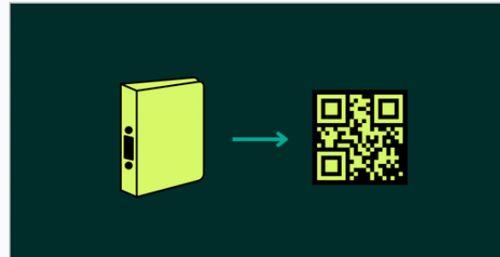
In many places, we come across paper binders full of work instructions and procedures that are unhandy and not available when employees actually need them.
Luckily, digital devices are getting common in the workplace and they have the power of bringing instructions closer to where the action is. Smartphones and tablets can bring instructions from the desk in the office to the pocket of workers in the factory.

3. From abstract text to crystal clear visuals.
Work instructions often are text-based and thus leave quite some room for interpretation and misunderstanding. If work takes place in a context that is highly visual, why use words to describe what needs to be done?
y stripping away "nice-to-know" info and keeping only "need-to-know" steps, you prevent mental fatigue and errors.

Combining images with text in a smart way is proven to make instructions even quicker to process and easier to understand. We see cases in factories, breweries, distribution centers and healthcare institutions that all benefit enormously from visual instructions.
Powerful illustrations, photos, and animations help people perform their job in a clear and concise way.

4. Write instructions in an accessible style.
In most cases, work instructions include both visuals and text.
Text is not an issue, but make sure the text is easy to understand. This requires application of writing guidelines and templates that ensure the clarity and understanding of text.
Simplified Technical English has some good pointers and some basic things to keep in mind are:
- Length of noun clusters: no more than 3 words:
- Example: From "stainless steel electrode impedance spectroscopy data" to "electrode spectroscopy data"
- Sentence length: no more than 20 words
- Example: Keep it short and simple. Limit sentence length to allow easy comprehension. Separate ideas into discrete sentences.
- Paragraphs: no more than 6 sentences
- Avoid slang and jargon
- Example: "Overs" becomes "extra pieces"
- Be as specific as possible
- Example: "Turn the dial" becomes "Turn the dial 45 degrees clockwise"
- Use simple verb tenses
- Example: "It has been leaking fluid" becomes "It leaked fluid"
- Use active voice
- Example: "The hose is clamped in place by the pliers" becomes "The pliers clamp the hose in place"

5. From machine-oriented to task-based.
Technical writing for work instructions is often done by engineers and tends to be focusing on the device or machine and its specific parts.
In order to improve the user experience, instructions should be:
- Task-focused (not machine part focused)
- Written from the user’s perspective (not the product's perspective)
- As simple as possible (don't use abbreviations or overly technical terms)

6. From ‘’everything covered’’ to ‘’minimalist"
We come across a lot of work instructions covering all the technical details of equipment and all sorts of exceptions.
However, that's usually not how the brain processes information in the best way.
In the workplace, this means information needs to be relevant and actionable.
- Avoid information overkill - easy and accessible is often better than complex and comprehensive.
- Focus on the regular task performance - what needs to happen?
- Zoom in on critical incidents that frequently occur.

7. Integrate into training.
Most companies offer before-the-job training for new recruits, however, that's usually not enough.
When people get familiar with the work instructions already as part of the training they know how to use them properly in the workplace and guarantees better performance in the job.
Ongoing on-the-job training with accessible work instructions gives everyone the opportunity to perform their job confidently and safely, without errors.

8. Well-designed activation.
Employees need to have access to the right instruction at the moment of need. This means you have to think about activating the content.
- Take into account what needs to exist at what point in time or at what location.
- The need for specific instructions varies. A new employee starting off at a machine has different needs that a service engineer that performs a troubleshooting task.
- QR codes, workflow integration, and NFC make accessible activation easy.
9. Track to improve.
Knowing how to write work instructions an important step.
But, tracking them to learn about work performance and possible improvements is just as critical. Digital work instructions allow you to follow the action and learn from both the user behavior, the sentiment and their feedback.
- The data collected can be turned into valuable blog for improvement. In a production environment, even the smallest optimization to procedures and/or work instructions can have a huge impact.
- We advise checking the analytics dashboards in your work instruction software on a regular basis.
- Discuss with your team what you can learn from them, and then act. Continue to improve your processes with the input from everyone involved.

10. Foster sharing and collaboration.
The ownership of the work instructions should lie in the workplace.
- If team leaders together with their staff have the ownership they will share and collaborate to improve them.
- People take pride in the instructions they created and collaborate to make processes even better.
- Knowledge sharing allows companies to share best practices across their operations. Locations around the world share their best guides with others in order to improve the instructions and the operational efficiency of the processes.

Wanna learn more about how to write better work instructions?
👉 Standard Operating Procedures (SOP) Best Practices & Guidelines.
👉 On-the-Job Training in Manufacturing: a Recipe to Train & Motivate.
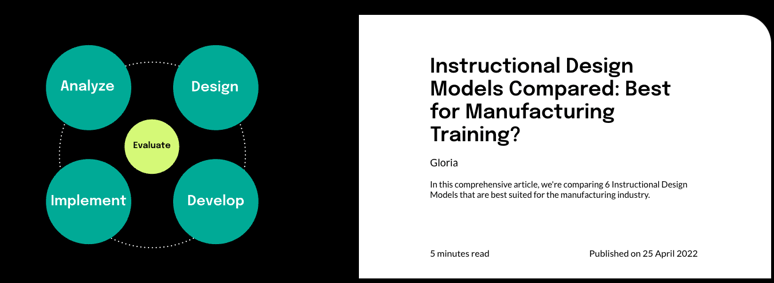
👉 Instructional Design Models Compared: Which One Should You Choose for Manufacturing Training?