

.svg)
 Shop floor execution
 Maintenance
 Production
 Skills
.png?width=60&height=60&name=chart-line-up%20(1).png) Manufacturing Intelligence
Manufacturing Intelligence
 Automotive
 Industrial materials
 Packaging
 CMMS/EAM
 MES
MES
 Connected Worker
 Manufacturing Intelligence
 Maintenance
 Continuous Improvement
 Operations
 IT
IT
 Executive Leadership
 Case studies
 Blog
Blog
 Ebooks & Guides
 Webinars
 Events
.svg) OEE Calculator
OEE Calculator
 Downtime Cost Calculator
 About Us
 Partners
 Newsroom
 Support
 Careers
 Trust center


.svg)

 Robin Lis
Robin Lis
Robin Lis
Welcome to Shift Change, our monthly rundown of what's new on the L2L platform and what it means for you.
This June, we're focusing on two things:
- Reducing the small friction points that slow your team down every day, from how you check notifications to how you filter reports and more
- Making it easier to build real skill development paths for your organization's unique needs
From Dispatch History improvements to a new L2L mobile experience on the way, here's what's new in June. These updates will be available to you on June 10th.
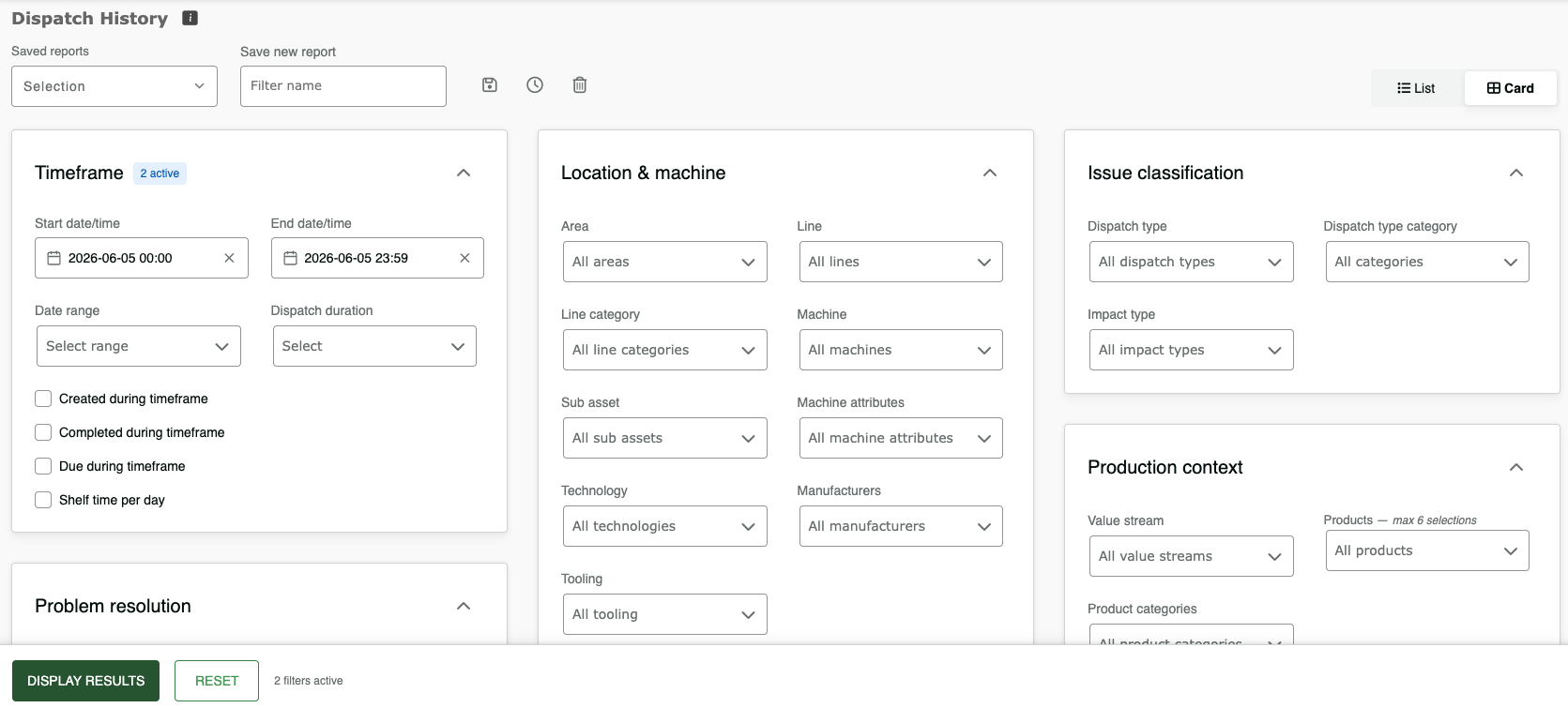
Dispatch History filters just got easier to navigate
The filter form has been reorganized so you can find what you need without hunting. Filters are now grouped by category, where each group shows how many filters you have active. If you prefer a more classic list view, a toggle switches you back.
Everything else, including cascading dropdowns, field options, and saved filters, works exactly the same.
What this means for you:
- Filters are grouped by category (date range, location & equipment, classification, people, product, and status), so related fields are always together.
- See active filter counts on collapsed cards so nothing gets lost.
- Prefer the old layout? A toggle switches you back to the classic list view.
Check notifications without losing your place
Before this update, checking notifications meant leaving whatever you were doing. Now, on desktop, the notification center slides out as an overlay when you click the bell icon.
Your current screen stays right where you left it. Check your notifications without losing your place in L2L. When you're done, click anywhere outside to close.
Nothing about your notifications has changed: same content, same filters, same settings, same bell icon location—just a faster, less disruptive way to get to them.
Lineside display improvements
We've made several updates to give your team a better at-a-glance experience on the shop floor. The result is a display your team can trust, on any screen, with numbers that actually reflect what's happening on the line.
What this means for you:
-
The display now scales to fit any screen—mobile devices, workstations, wall-mounted TVs—so it looks right wherever your team views it.
- Inactive pitches no longer skew your demand, target, and actuals numbers, so operators always see accurate data.
- Updated styling and responsive controls make the interface cleaner and easier to read at a glance.
Protect user data with additional GDPR compliance controls
For our European customers: A new site setting will automatically delete a deactivated user's profile image and clear their contact information (email, phone, SMS email) when their account is deactivated.
A one-time bulk cleanup option is also available for users who are already inactive.
Reach out to Support if you'd like this enabled for your site.
Build structured development paths with Learning Journeys
When operators need to grow a specific set of skills, trainers have historically had to assign them one at a time, with no way to set priority order or a clear timeline. Learning Journeys changes that, giving trainers a single place to define which skills a team or individual needs to complete, in what order, and by when.
What this means for you:
-
Team-Level Journeys: Set a job title, choose the skills that matter, define the order, and assign a timeframe, weeks or months, for each step. Save once, and it applies to every team member with that job title.
- Individual-Level Journeys: For more nuanced situations, you can set a learning path for a specific person, with exact due dates per skill.
- Drag-and-drop ordering: Trainers can reorder skills the way they'd actually prioritize them on the floor.
Customers interested in adding on Advanced Skills capabilities should speak to their Customer Success Manager.
See the whole skills picture with the Skills-Based Matrix Overview
Before, trainers had to spend time clicking through individual user profiles just to figure out who was qualified for a specific skill. The Skills-Based Matrix Overview flips that, giving you a workspace-wide view organized by skill, not by person, so you can spot gaps and pending approvals at a glance. This allows for skill Assessors to check the status of and take action on self-assessments without relying on individual email notifications.
What this means for you:- Use the new Skills-Based Matrix as your one-stop shop. Switch between a team-wide view, an individual profile, or a workspace-wide skill list in a single click
- Find what you need instantly using search and quick page navigation, eliminating the need for manual scrolling.
- Get instant clarity on what each skill level means just by hovering your mouse over it.
- Unblock your team faster by filtering for users awaiting approval, so you can take action without digging through email notifications.
By replacing the old user-list workflow with a skills-first matrix view, the Skills-Based Matrix Overview gives trainers an immediate, accurate read on gaps and approvals across the whole workspace, without the manual hunting.
Customers interested in adding on Advanced Skills capabilities should speak to their Customer Success Manager.
Coming soon: Enhancements on the horizon!
A more accurate OEE calculation coming in July
We're updating how OEE is calculated in Dispatch so your numbers always add up the way you'd expect.
Until now, your OEE score didn't always match what you'd get by multiplying its three parts together (Availability, Performance, and Quality). That small disconnect could make the math hard to trust when you went looking for answers.
This update, which goes live on Wednesday, July 8, ensures your reporting is in full alignment with the standard formula:
OEE = Availability × Performance × Quality
The result is a single, dependable number you can verify at a glance and reporting you can stand behind with confidence.
What to expect:
You may notice your OEE shift slightly after July 8. This isn't because anything changed on your floor. It's because the calculation is now more complete and accurate. The shift is usually small at the site level, though individual lines that have seen a lot of downtime may move more, since those scores are now reflecting reality more closely. Your Availability, Performance, and Quality metrics themselves aren't changing, only the way they come together to form OEE.
No action is required before July 8. If you have questions about this change, please reach out to Support. If you'd like to see the impact early, sandbox environments are available for testing now.
A faster, more reliable L2L mobile experience is on the way
The L2L Mobile app is getting an update built for the pace of the factory floor — faster, more reliable, and designed to get the right people moving on the right problems without delay.
What this means for you:
- Push notifications ensure critical dispatches never get missed.
- Sign in instantly with Face ID, Touch ID, or Android biometrics — no passwords on the floor.
- Tap a notification and go directly to the specific dispatch or machine detail you need, no extra navigation.
This is an in-place update. Existing L2L mobile app users will receive it automatically.
Site Admins: make sure your MDM is configured to allow the latest store update so your team gets these improvements right away. If you want a test account, reach out to Support, and we'll register you for our Beta.
Housekeeping: A few things to note
Reach support through Slack, Teams, or in-app with Pylon
On June 22, we’re moving our support operations from Zendesk to Pylon. Your existing tickets and support email addresses aren't changing, but you'll have new ways to reach us:
- In-app chat and ticketing: start a conversation or submit a ticket directly within the L2L application.
- Slack and Microsoft Teams integration: Reach Support without leaving your workspace (contact Support to set this up for your organization).
- Customer Portal: Track open tickets, review past resolutions, and manage requests across your organization in a centralized hub.
Our Changelog is also moving from the Zendesk Community to Confluence, where release notes and documentation will be easier to browse and search.
To stay up to date on every minor update and major feature, check out the changelog here.