

.svg)
 Shop floor execution
 Maintenance
 Production
 Skills
.png?width=60&height=60&name=chart-line-up%20(1).png) Manufacturing Intelligence
Manufacturing Intelligence
 Automotive
 Building materials
 Packaging
 CMMS/EAM
 MES
MES
 Connected Worker
 Manufacturing Intelligence
 Case studies
 Blog
Blog
 Ebooks & Guides
 Webinars
 Events
.svg) OEE Calculator
OEE Calculator
 Downtime Cost Calculator
 About Us
 Partners
 Newsroom
 Support
 Careers
 Trust center


.svg)

 Robin Lis
Robin Lis
Robin Lis
Welcome to Shift Change, our monthly rundown of what's new on the L2L platform and what it means for you.
This July, Execution AI gets a major upgrade. For the first time, your Production team has two new, out-of-the-box production-focused Solvers (and a handful of other enhancements to Execution AI).
We're also delivering other core platform improvements—including an important update to how OEE is calculated and more.
These updates will be available to you on July 9th.
Execution AI for production teams, easier discovery, and more
Line Pulse Check Solver: Understand line performance in moments
Line leaders and production supervisors spend too much time compiling data to make decisions. The Line Pulse Check Solver changes that by delivering an instant, AI-generated snapshot of line health over the past 24 hours.
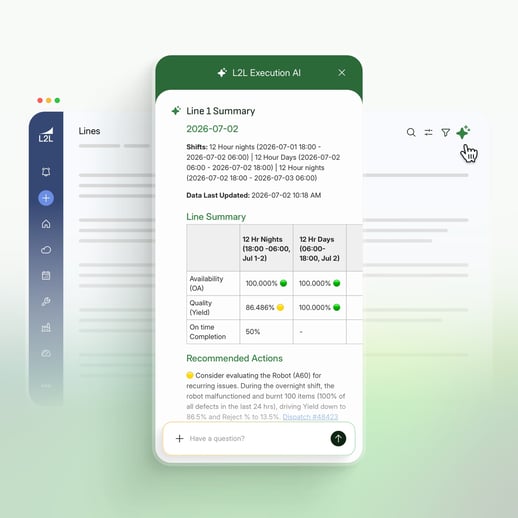
Available right from the Homepage or Operator Portal, it aggregates daily shift insights into a single view. Get instant insight into Availability, Quality, On-Time Completion, and recommended actions to improve line performance.
What used to take hours now takes seconds—with just one click.
Shift Handover Solver: Insights before a shift begins
Fifteen minutes before a shift ends, supervisors receive an automatic notification with their Shift Handover Summary. Get access to the information you need to make sure shift handoffs are smooth.
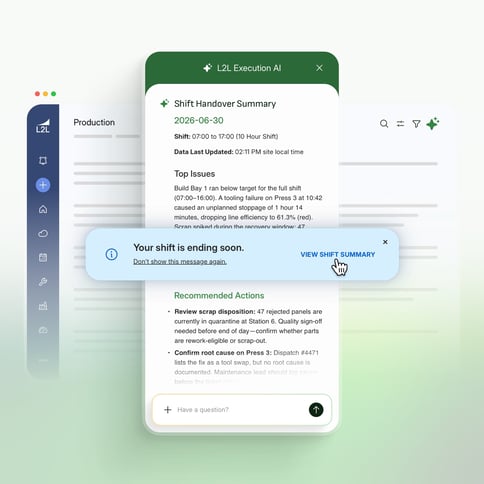
The Shift Handover Solver covers:
-
Precisely what happened during the shift
- How actuals stacked up against targets
- The critical issues requiring immediate attention
- Recommended actions for the incoming team
Execution AI that's easy to find, access, and use
We've completely overhauled the Execution AI user experience.
Now, Execution AI dynamically adapts to whatever page you're on. If you're looking at the Dispatch Portal, the most relevant Dispatch Solvers automatically surface. On the Homepage, you'll see line-level insights. On the Operator Portal, you'll see shift handoff information.
With clear descriptions for every Solver, your operators and techs know exactly what information they're getting before they click.
AI-generated reporting
Now, Execution AI can generate a Dispatch History Report based on your most frequently used filters so you can instantly verify and act on AI-recommended insights with the exact supporting data behind them.
Additional enhancements
OEE metrics: One number you can verify
Starting July 8, OEE in L2L Dispatch will be updated to align with the standard industry formula: Availability × Performance × Quality = OEE.
This resolves a discrepancy where OEE could not always be verified by looking at its individual components. By moving to a single consistent data set, the OEE on your dashboards will now always reconcile perfectly with the underlying metrics.
What this means for you:
-
You may notice a shift in aggregate OEE values, typically between one and three percentage points. This is not a change in actual line performance, but a more accurate and transparent reflection of your total floor activity.
Accurate metrics for concurrent production lines
If your facility runs multiple products simultaneously on a single line, your production metrics now reflect reality.
Previously, concurrent production runs could produce calculation errors across Performance, OEE, PEFF, TEFF, and Labor Efficiency. This update fixes the underlying calculation so every metric is accurate whether your line is running one product or several at the same time.
What this means for you:
-
Performance, OEE, PEFF, TEFF, and Labor Efficiency now calculate correctly for concurrent production runs—no workarounds needed.
-
The Operator Portal has been updated to support specifying concurrent work streams at changeover and managing multiple in-process orders on a single line.
-
Metrics are more trustworthy and consistent across your dashboards and reports.
Updated L2L mobile app is here
We've begun rolling out the latest version of the L2L mobile app, which introduces reliable push notifications. This is a version update to your existing app and will replace the current version on user devices. The update is rolling out gradually throughout the week.
What this means for you:
- Push notifications ensure critical dispatches never get missed.
- Sign in instantly with Face ID, Touch ID, or Android biometrics—no passwords on the floor.
- Tap a notification and go directly to the specific dispatch or machine detail you need, no extra navigation.
Stay ahead of skill expirations
Skills now show a warning before they lapse, not just after. Operators receive push and email notifications 30 days and 7 days before a skill expires. Admins can filter the Skills matrix by "Will Expire" status to plan re-certifications ahead of time, before anyone goes non-compliant.
Larger video file uploads for visual guides
The visual file upload limit is increasing by 50 MB, making it easier to upload high-resolution training videos and other large files. Admins can enable and adjust the limit from the admin panel.
Coming soon!
Execution AI: Ask follow-up questions
After running a Solver, you'll be able to ask follow-up questions to slice and dice your data:
-
Deep dive into dispatches: Filter by type, date range, line, or area immediately after running a Solver.
-
Instant production metrics: Pull OEE, downtime, scrap, or quality data into the chat instantly.
- Zero guesswork: The AI confirms exactly what data parameters it's analyzing before it responds, so you can make high-stakes decisions with confidence.
To stay up to date on every minor update and major feature, check out the changelog here.