

.svg)
 Shop floor execution
 Maintenance
 Production
 Skills
.png?width=60&height=60&name=chart-line-up%20(1).png) Manufacturing Intelligence
Manufacturing Intelligence
 Automotive
 Building materials
 Packaging
 CMMS/EAM
 MES
MES
 Connected Worker
 Manufacturing Intelligence
 Case studies
 Blog
Blog
 Ebooks & Guides
 Webinars
 Events
.svg) OEE Calculator
OEE Calculator
 Downtime Cost Calculator
 About Us
 Partners
 Newsroom
 Support
 Careers
 Trust center


.svg)

Welcome back to Shift Change, our monthly rundown of what's new on the L2L platform and what it means for you.
This August, we're focused on one big theme: giving your team a single, trustworthy place to work - whether that's planning a maintenance week, writing an instruction, or getting a straight answer about a dispatch.
From our new Maintenance Planner to smarter instruction authoring and faster answers from Execution AI, here's what's new in August.
These updates will be available to you on August 12.
L2L Maintenance Planner: One screen for your whole week.
Maintenance planners have been stuck bouncing between an inherited Excel spreadsheet, a list-only Dispatch Portal, and a handful of disconnected calendars just to build a single day's schedule.
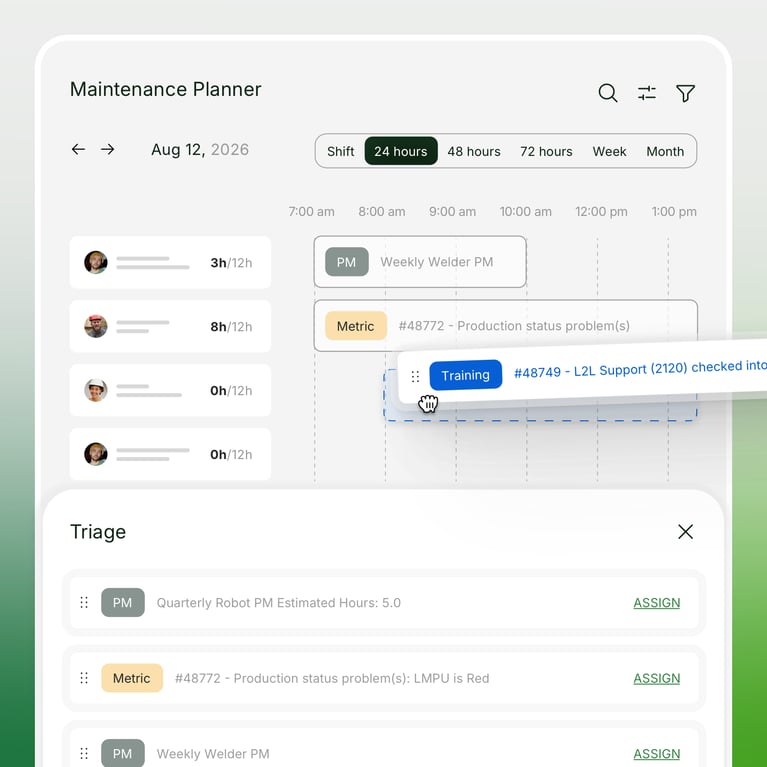
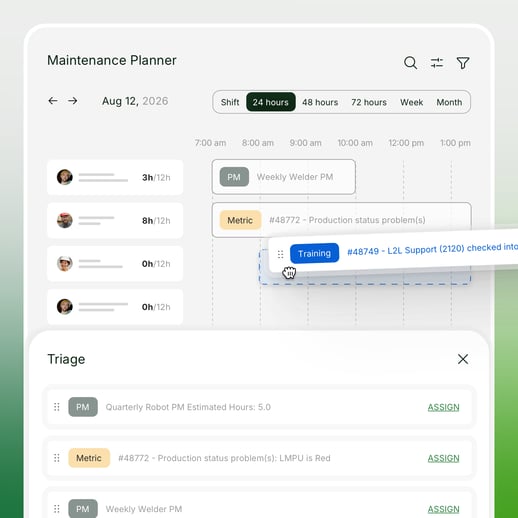
The L2L Maintenance Planner changes all of that, bringing your resources, work orders, PMs, and dispatches into one drag-and-drop workspace. Now, your team can see everything that affects the week and act on it without leaving the screen.
What this means for you:
- See resources, work orders, PMs, and dispatches together in one view. Switch between Shift, 24-Hour, 3-Day, Week, or Month views depending on how far out you're planning.
- Assign or reassign work by dragging it directly onto a technician's row.
- Filter by trade to get the right expert on the right task. Pull up just your electricians, or just your mechanics, so you're scheduling with the people who can actually do the work.
- Unassigned work lives in one place, ready to drag onto whoever has room, instead of scattered across sticky notes and side conversations.
- See the workload before you add to it. Every view shows each person’s work volume, so you always know where there's room.
- Overlapping assignments are flagged right on the schedule, so potential conflicts are caught early.
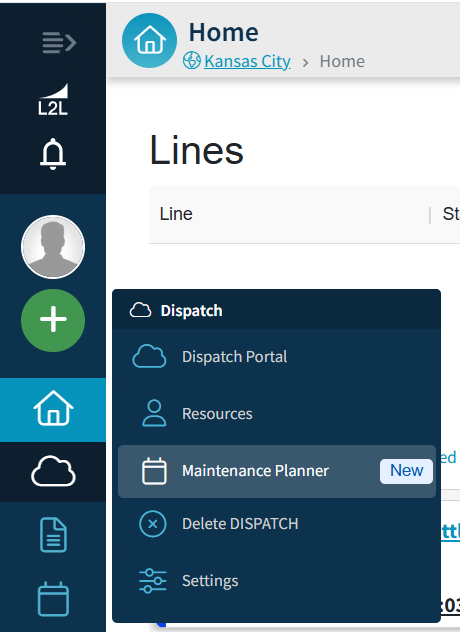
Maintenance Planner is available now as part of your Advanced Maintenance subscription. There’s no new purchase, and nothing you need to do to get access. Simply find it under the Dispatch section in the left navigation.
SwipeGuide AI: Faster instruction authoring, from creation to review
Building instructions manually has always taken longer than it should - recording every step, writing it up, formatting it, then hoping the video actually plays the way you expect once it's live. Two updates fix that, covering the whole authoring workflow from first draft to final approval.
What this means for you:
- Create an instruction automatically from a video recording. Upload footage of the task being performed, and AI turns it into a structured, step-by-step instruction, instead of an editor building each step manually from scratch.
- Skip the blank page. Editors still review and refine the AI-generated draft, but they're starting from a real first pass instead of nothing.
- Preview video and other media directly in the instruction builder. Confirm everything works before it goes live. No more publishing, catching a problem, and creating a new version just to fix it.
- Fewer duplicate guide versions. Since media can be checked in the builder itself, there's no more back-and-forth between draft and live environments just to confirm something works.
Dispatch AI: Smarter, faster answers from Execution AI
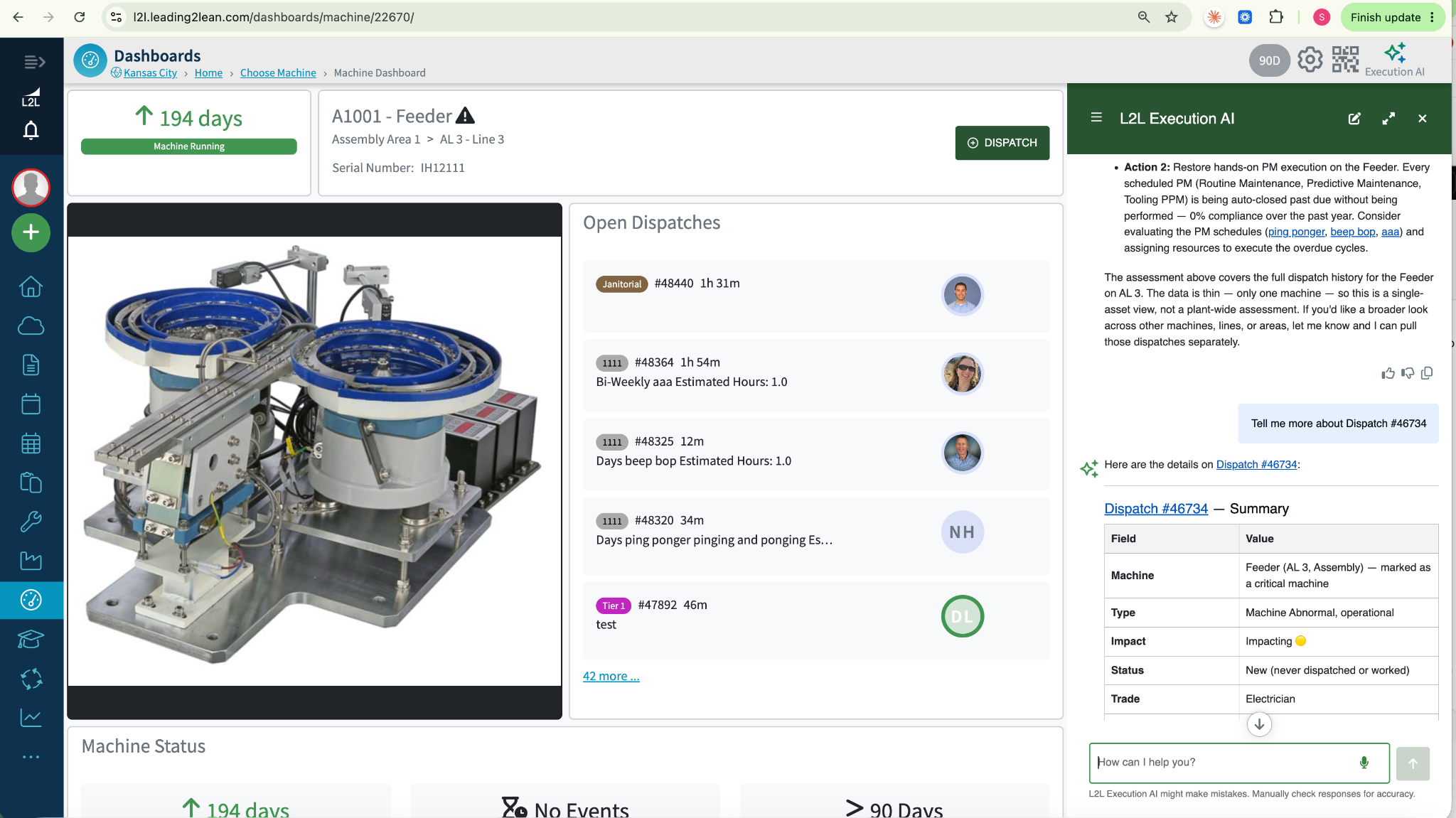
Execution AI is easier to use for real-time questions about your dispatches, not just structured Solver reports.
What this means for you:
- Ask Execution AI about any Dispatch on your site, from anywhere you can chat with it. No need to navigate to a specific report first—just ask.
- Act on AI recommendations in one click. When Execution AI recommends updating a PM or checklist—whether from the PM Effectiveness Solver, another Solver, or open chat—click to make the change instead of hunting down the right page yourself.
- Auto-generate customizable checklists from a file or pasted text. It's now easier to add custom instructions for the AI when uploading a file or pasting text, so the checklist it creates fits your process from the start.
Coming soon!
A few things we're excited about heading into next quarter:
- Checklist API automation: Submit checklist answers programmatically, replacing manual entry and custom-built workarounds.
- AI-assisted Dispatch creation: Supervisors will be able to create a Dispatch directly from an Execution AI chat or a Recommended Action, no extra steps required.
- Louder, harder-to-miss mobile alerts: Priority notifications override device volume, so they're heard over machine noise on the floor.
- A new look for Dispatch: We're rebuilding the application header and navigation as the foundation for a better experience over time.
To stay up to date on every minor update and major feature, check out the changelog here.