 Automotive
 Industrial materials
 Packaging
 CMMS/EAM
 MES
 Connected Worker
 Manufacturing Intelligence
 Maintenance
 Continuous Improvement
 Operations
 IT
 Executive Leadership
 Case studies
 Blog
 Ebooks & Guides
 Webinars
 Events
 OEE Calculator
 Downtime Cost Calculator
 About Us
 Partners
 Newsroom
 Support
 Careers
 Trust center




Welcome to the November 2026 edition of Shift Change, your monthly report on product updates, feature enhancements, and innovations across L2L.
Shop Floor Execution continues to get more powerful. This month, AI-powered Draft Plan in Maintenance Planner is now in Beta for every Shop Floor Execution customer, putting Execution AI to work and building your maintenance schedule in seconds.
Across the broader platform, we’re giving teams more control and visibility:
- Role-based rules for closing dispatches
- Multiple dispatches associated with a single work order
- A new annual view in Maintenance Planner
- Smarter, more reliable data imports
Let’s take a closer look at how they help teams win the day.
Shop Floor Execution: Planning at the Speed of AI
Maintenance Planner AI (Shop Floor Execution Only)
Maintenance Planner’s AI Draft Plan is now in beta for all Shop Floor Execution customers. Instead of building the schedule by hand, let Execution AI do the legwork. In seconds, it creates a complete draft that matches work to the right technicians while accounting for trade skills, resource availability, and plant constraints. You stay fully in control: review, adjust what you want, and approve. Nothing goes live until you say so. Learn more.
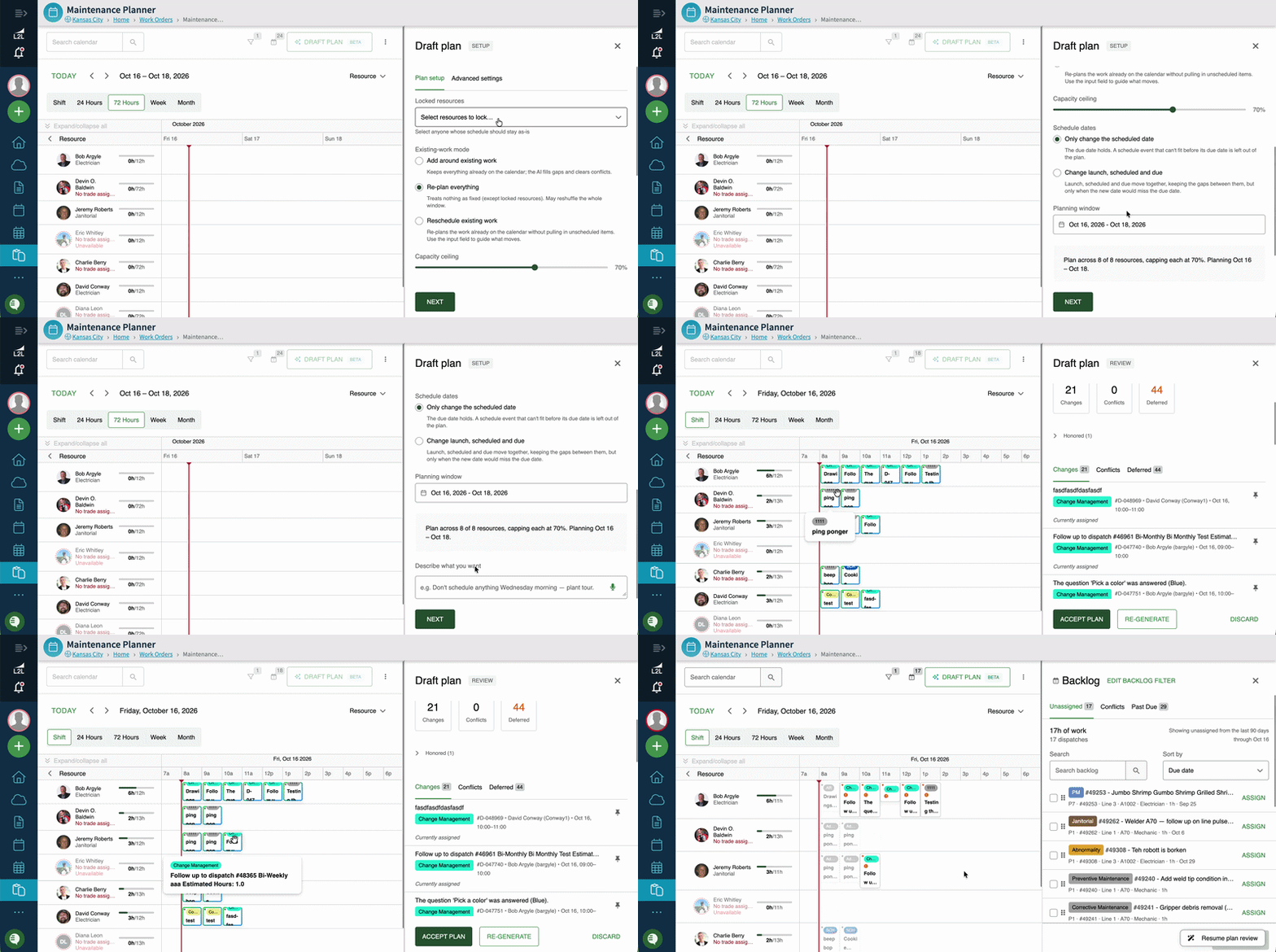
What this means for you: Stop building schedules from scratch and start with a strong draft. Hours of planning become minutes of review, so your expertise goes into the decisions that matter and the right work reaches the right technicians faster.
General Product Enhancements: More Control, More Visibility
We’re continuing to expand the capabilities L2L teams rely on every shift, delivering new levels of control, planning power, and ease of use for all customers.
Limit Dispatch Closing by Role: Every Close Is a Verified Close
Admins can now control exactly who can complete or close a dispatch, based on the resource category. For example, only Safety and Management can close Safety dispatches, ensuring the right people validate critical work before it’s marked complete. Close permissions are set up by dispatch type, so each kind of work follows the rules that fit it. Learn more.
What this means for you: Confidence that work is truly done. Safety, quality, and other critical dispatches are closed only after the right people have verified them, strengthening accountability and audit readiness across every shift.
Multiple Dispatches in a Single Work Order: One Record for the Whole Job
Previously, a work order could have only one dispatch. Now you can associate as many dispatches as you’d like with a single work order, whether you’re creating new dispatches from scratch or linking to dispatches that are already open. Every piece of a larger job lives in one record, whether that’s a line shutdown, a response to a safety event, a facilities issue, or a project like a new machine install, so the work can be planned and tracked in one place. Learn more.
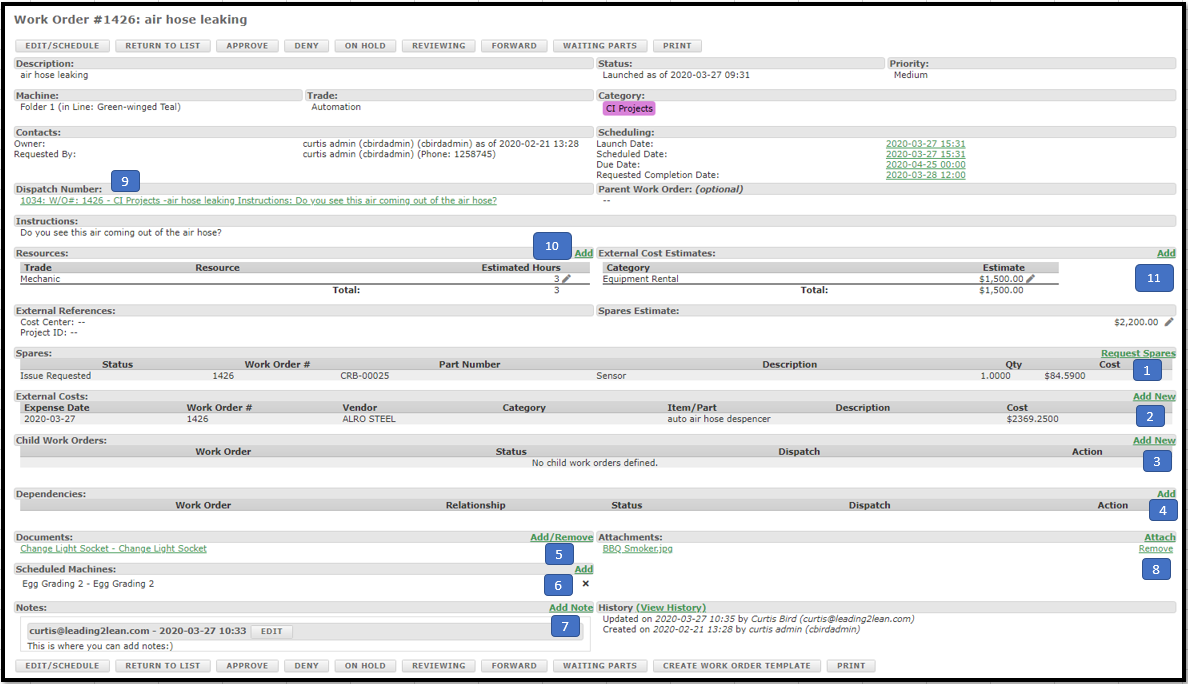
What this means for you: Plan any large job inside L2L without the need for spreadsheets. See the complete scope of a given project, making it easier to coordinate teams, track progress, and ensure nothing gets missed.
Maintenance Planner Annual View: Your Entire Year at a Glance
A brand-new Calendar view within Maintenance Planner brings a full year of schedules, work orders, and dispatches into a single screen, shown as weekly status counts. Planners can compare workload across months at a glance, and then drill into any week for the details.
What this means for you: Strategic planning made simple. Planners can spot peak periods, balance workloads across the year, and plan shutdowns and major PMs with confidence, well ahead of time.
Import Improvements: Load Your Data With Confidence
Imports are now smarter, more reliable, and easier to use. No more hunting through the help center for the right templates. They’re now linked directly from the import page. Once you upload a file, a redesigned step-by-step setup previews your data and flags required fields before anything loads. Errors and structural issues are also caught upfront, with clear feedback on exactly what to fix.
What this means for you: Cleaner data, loaded faster. For imports you run yourself, you’ll get it right the first time with less back-and-forth, accelerating your time to value. For the rest, the same improvements will enable our team to load your data faster.
Whether you’re expanding Shop Floor Execution across your plants or unlocking more from the platform you already use, our goal remains the same: empowering your teams to win every shift.
Ready to upgrade to Shop Floor Execution? Reach out to your Customer Success Manager to learn about our upgrade enablement packages.
Want the full technical breakdown? Check out our Knowledge Base and stay up to date on every minor update and major feature release in the L2L Changelog.
Coming Soon: Smoother Navigation in Dispatch and Near Real-Time Analytics
Next month, we’re refining the primary left navigation menu of the product so that submenus only open when you click them. No more unexpected pop-ups as you move your cursor. Hovering over a menu item will still show a quick highlight and label tooltip, and clicking an option or anywhere outside the menu will neatly close it.
What this means for you: A cleaner, more focused workspace. Your screen stays clear of distractions while you work, and navigating the left menu feels smoother and more intuitive on both desktop and touch devices.
Today, L2L Analytics refreshes once a day. Soon, Shop Floor Execution customers will see their Analytics data refresh within minutes, so dashboards and reports reflect today’s operations instead of yesterday’s.
Stop waiting until tomorrow to see today’s plant health. Review shift performance, downtime trends, and KPIs while the day is still underway, and bring current numbers into your daily meetings.