


.svg)
 Shop floor execution
 Maintenance
 Production
 Skills
.png?width=60&height=60&name=chart-line-up%20(1).png) Manufacturing Intelligence
Manufacturing Intelligence
 Automotive
 Building materials
 Packaging
 CMMS/EAM
 MES
MES
 Connected Worker
 Manufacturing Intelligence
 Case studies
 Blog
Blog
 Ebooks & Guides
 Webinars
 Events
.svg) OEE Calculator
OEE Calculator
 Downtime Cost Calculator
 About Us
 Partners
 Newsroom
 Support
 Careers
 Trust center


.svg)


A successful CMMS implementation serves as the operational foundation for modern, data-driven industrial maintenance management.
Unfortunately, a majority of these implementations fail to deliver their promised value or reach steady-state adoption on the plant floor. These digital transformation initiatives underperform not because the underlying software lacks technical capability, but because the human rollout strategy fails.
When a deployment is treated as a software installation rather than an exercise in operational change management, the platform quickly becomes expensive shelfware. Manufacturing operations cannot afford to waste capital on systems that maintenance teams ultimately abandon in favor of whiteboards, spreadsheets, or verbal communication.
We created this guide to outline a practical, plant-tested framework designed to circumvent the common structural traps that stall software rollouts. By focusing heavily on frontline utility and rapid execution, industrial organizations can successfully transition from reactive chaos to structured, predictable uptime.
What you’ll learn in this article:
- Implementation is not installation: True success requires driving operational and cultural alignment across shifts, not merely turning on a cloud server.
- Prioritize speed-to-value: Operations should aim to go live on critical lines within 90 days rather than engineering a flawless, all-inclusive nine-month database.
- Technician adoption is decided early: Frontline engagement is won or lost in the first two weeks, which is why mobile-first accessibility and minimal data-entry fields are non-negotiables.
What does CMMS implementation actually mean?
A CMMS implementation is the structured process of configuring the software platform, migrating core asset data, training frontline personnel, and reaching steady-state adoption across the maintenance ecosystem, typically occurring over a window of 60 to 120 days.
Manufacturing leaders must recognize the critical difference between technical go-live and true operational adoption. Technical go-live simply means the database is active, licenses are provisioned, and the system is technically running.
Operational adoption, by contrast, occurs only when technicians willingly use the platform as their primary workflow tool, completely replacing legacy fallback methods like paper slips, radios, spreadsheets, or whiteboard notes. Most failed projects evaluate success solely by the go-live milestone while completely missing the adoption metrics that drive actual ROI.
Why most CMMS implementations stall
When a computerized maintenance management system fails to deliver results, the root cause can almost always be traced to one of three common organizational failure modes:
- Database overload: Organizations frequently attempt to audit, clean, and import every single mechanical asset across an entire enterprise on day one. The maintenance team becomes thoroughly burned out by tedious data entry before the system even launches, causing the project to lose momentum.
- Over-engineered workflows: Designing a system with six different approval stages for routine maintenance work kills responsiveness. When a technician must wait days for a supervisor to sign off on a forty-dollar filter replacement, the frontline team exercises a pocket veto, bypassing the software to execute repairs quickly without logging the work.
- Feature-heavy classroom training: Forcing technicians to sit through exhaustive multi-hour training sessions covering dozens of advanced, unused software features produces cognitive fatigue. Consequently, user retention plummets, and adoption rates drop sharply within the first 30 days post-launch.
The team that ships an imperfect system in 30 days beats the team that ships a perfect system in nine months, every time.

The 7-step CMMS implementation process
Step 1: Define success in operational terms
Stating that a plant will go live by the conclusion of the second quarter is a project milestone, not a defined business outcome. Manufacturing leaders must establish clear, baseline-driven targets before modifying a single line of software code.
Operational goals should include:
- Reaching a specific preventive maintenance (PM) compliance rate,
- Reducing the Mean Time to Repair (MTTR)
- Maximizing the percentage of work orders closed directly on mobile devices
- Ensuring high technician adoption rates.
Every goal must be anchored directly to the facility's current baseline numbers to accurately quantify future financial returns.
Step 2: Audit the current state
Organizations can’t optimize a workflow that has not been explicitly mapped. Teams must thoroughly document where maintenance requests live today, whether they are scattered across paper logs, Excel spreadsheets, legacy ERP modules, or a combination of all three.
This step requires identifying:
- Who currently generates requests
- How parts are allocated, who officially closes work orders
- What the true historical PM compliance rate looks like
Documenting these existing gaps protects the rollout from inheriting broken, offline habits.
Step 3: Build the asset hierarchy (the 80/20 way)
Attempting to map every minor asset instantly creates operational gridlock. Instead, maintenance leaders should employ the 80/20 rule, focusing exclusively on the top 20% of critical equipment that drives 80% of unplanned downtime costs.
Equipment registries must be structured logically by production line, physical system, and component—matching how technicians naturally recognize the plant floor—rather than how the assets were categorized during procurement.
The minimum viable asset record at launch requires only four critical fields:
- Asset name
- Physical location
- Criticality rating
- Parent asset or line affiliation
Advanced documentation, original equipment manufacturer (OEM) manuals, and deep specifications can be appended progressively over time.
Step 4: Configure work order workflows
Work order routing should be engineered for maximum velocity on the floor. Workflows must place a strict cap of two approval levels for non-emergency tasks, and zero approvals for safety or production-stopping incidents.
The system should support mobile-first submissions and leverage automatic assignment logic based on a technician's specific skill level, current workload, and plant location. When configuring custom fields, organizations must strictly limit inputs to data that reporting absolutely requires; every mandatory field functions as a direct data-entry tax on the frontline staff.
Step 5: Migrate the minimum viable data
When moving data into a new platform, the core objective is maintaining data integrity. Importing messy, inaccurate historical records from legacy spreadsheets ensures that users will immediately distrust the new asset registry.
Plants should migrate only:
- The validated critical asset list
- A basic spare parts inventory
- Active PM schedules
Unless explicitly required for regulatory compliance or strict audit trails, historical work orders should be securely archived in an external read-only database rather than imported, allowing the maintenance department to start completely clean.
Step 6: Train role-by-role, not all at once
Mixing distinct plant roles into a single, generic training session causes immediate confusion.
Frontline technicians do not need to understand long-term capacity planning or inventory purchasing workflows. Instead, technicians should receive a focused, ten-minute mobile demonstration at the start of a shift that highlights exactly three fundamental actions: receiving an assigned work order, completing the specified tasks via a mobile device, and closing the order with an attached verification photo.
Maintenance supervisors, planners, and inventory managers must be trained in separate, isolated sessions tailored strictly to their daily operational responsibilities.
Step 7: Pilot, then expand on a usage trigger
Rather than executing a risky, plant-wide launch, operations should pilot the new system on a single production line or within a single shift. Leadership can activate digital PM generation for the first 20% of critical assets during month one. Expansion to the next 20% tier should occur only when the active pilot zone successfully hits and maintains its designated operational threshold, such as a steady 85% PM compliance rate. Prioritizing adoption depth over implementation scope ensures long-term stability.
Real-world operational impacts
When an industrial operation moves away from fragmented tools and executes a structured, process-driven system rollout, the resulting operational improvements are both swift and measurable.
Johnson Controls
By focusing heavily on frontline process standardization and aligning teams with rigid preventive maintenance compliance metrics, Johnson Controls successfully eliminated reactive maintenance firefighting. This disciplined approach to workflow structure allowed the organization to save more than $2.6 million across monitored manufacturing sites in under 12 months.
West Liberty Foods
Faced with the challenges of legacy data tracking and fragmented record management, West Liberty Foods migrated to a centralized digital framework. By replacing paper binders and disorganized filing systems with standardized asset records, the company achieved a $2 million reduction in total maintenance costs while driving a 10% increase in overall Operational Availability (OA).
Worthington
Unplanned downtime acts as a direct drain on manufacturing profitability. Worthington tackled this issue by integrating real-time shop floor visibility with an optimized, automated maintenance scheduling system. This transition from reactive repairs to predictive maintenance intervals allowed the plant to reduce unplanned downtime by 350 hours, resulting in $1 million in machine downtime cost avoidance.
CMMS implementation timeline: what realistic looks like
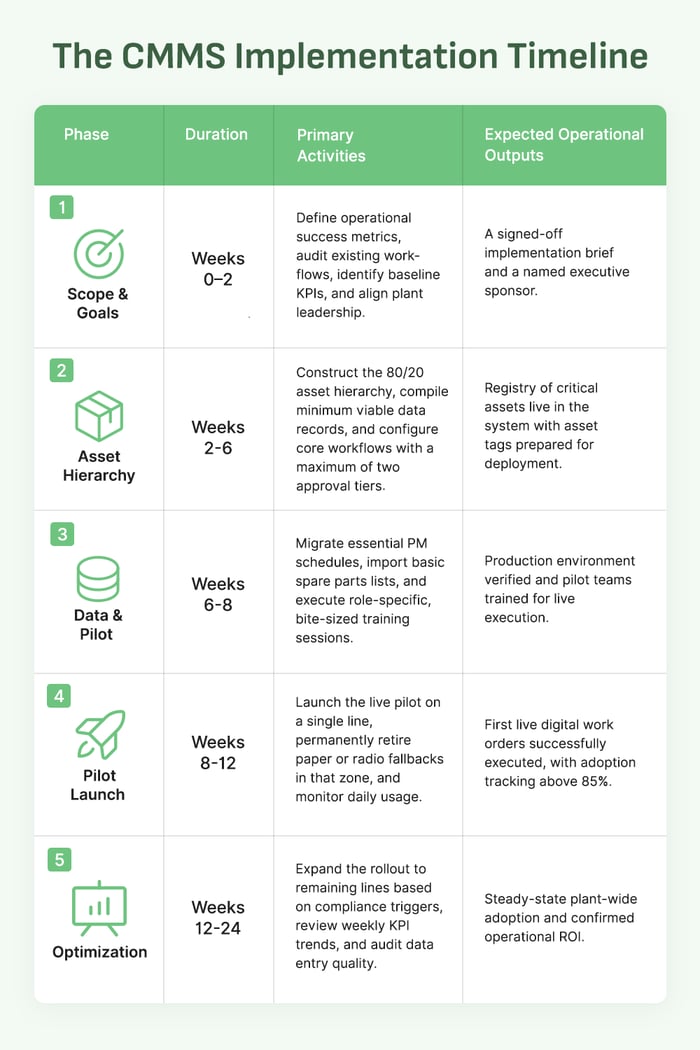
Achieving true operational adoption requires a realistic, phased timeline. While a modern cloud platform can allow a facility to generate its first live digital work orders within three to five business days of provisioning an account, full plant-wide optimization generally requires a 90-day window.
How to measure CMMS implementation success
Manufacturing leaders should actively track five key performance indicators starting from the very first week of deployment to gauge the health of the rollout:
- PM compliance rate: Tracks the percentage of scheduled preventive maintenance tasks completed on time. The organization should target a steady state of 85% or higher to shift successfully from reactive to proactive maintenance.
- Percentage of work orders closed on mobile: Measures frontline platform utilization. A target of 70% or greater ensures technicians are interacting with the software in real time, directly next to the machinery, rather than batch-entering data at the end of a shift.
- MTTR reduction versus baseline: Measures the average speed of failure resolution. This metric should trend steadily downward as automatic routing, digital SOPs, and part visibility streamline the repair process.
- Technician adoption rate: Tracks the percentage of the frontline workforce actively logging hours and updating tasks within the system. The modern benchmark requires hitting an 85% adoption rate within the first 30 days of live operation.
- Work order backlog age: Monitors the volume of open maintenance tasks older than 30 days. A successful implementation should cause this backlog to contract as prioritization and scheduling efficiency improve.
Common CMMS implementation pitfalls (and how to avoid them)
Pitfall 1: All-inclusive asset import
- The danger: Attempting to enter every single ladder, hand tool, and minor motor into the database before launching causes administrative exhaustion and delays go-live by months.
- The fix: Focus exclusively on the critical 20% of equipment that directly impacts production throughput. Expand the registry systematically only after the core team masters the initial setup.
Pitfall 2: Overlapping approval steps
- The danger: Requiring multiple management signatures for simple repairs creates immediate bureaucratic bottlenecks, causing technicians to bypass the software entirely.
- The fix: Hardcode a maximum of two approval tiers into the workflow configuration. Leverage automatic assignment rules to route tasks instantly based on technician specialization and current proximity.
Pitfall 3: Absence of an active executive sponsor
- The danger: Viewing the software rollout purely as a localized maintenance department task rather than an operational evolution causes cross-departmental alignment to collapse.
- The fix: Assign a dedicated corporate or plant-level executive leader who is directly accountable for weekly usage compliance, inter-departmental cooperation, and financial KPI delivery.
Pitfall 4: Treating training as a single event
- The danger: Relying on a single marathon classroom session results in poor information retention and low long-term engagement on the floor.
- The fix: Deploy short, ten-minute reinforcement sessions directly at the shift-start huddle once a week for the first four weeks post-launch, answering real floor questions in real time.
Pitfall 5: Evaluating go-live instead of true adoption
- The danger: Celebrating a successful system launch when data is technically flowing, while ignoring the fact that technicians are secretly returning to paper notes or messaging apps.
- The fix: Recognize that the frontline technician adoption rate is the single most important metric of operational health during the first 60 days of usage.
How L2L makes CMMS implementation faster and more successful
The L2L implementation playbook is engineered entirely around driving frontline adoption from day one. Because the platform is cloud-native and mobile-first, maintenance teams can eliminate the complex server configurations and technical barriers that traditionally delay legacy software deployments. By utilizing minimalist default templates and data-entry screens stripped of unnecessary friction, technicians can seamlessly log actions without facing data fatigue.
L2L's dedicated Technical Services team collaborates directly with plant leadership throughout the rollout process, ensuring that workflows are optimized to deliver verified live work orders within a matter of weeks.
This execution-focused framework allows manufacturers to rapidly connect maintenance activities with broader production realities.
Frequently asked questions about CMMS implementation
How long does a CMMS implementation take?
For most discrete manufacturing facilities, generating the first digital work orders takes three to five business days following system provisioning, with full plant-wide rollout wrapping up within 60 to 120 days. Complex, multi-site global enterprises or highly regulated environments requiring validated compliance audits generally take between six and twelve months to achieve standardized adoption.
What data is required before starting?
At a minimum, organizations need an accurate registry of critical assets that includes names, functional categories, physical locations, and baseline criticality rankings. While historical maintenance data can provide helpful context for long-term predictive analytics, importing it is not a requirement for launching a successful system.
Is a dedicated IT team required for CMMS implementation?
No. Modern, cloud-based software platforms allow account creation, workflow configuration, and asset data imports to be managed directly by the maintenance manager or plant supervisor. Internal IT resources are typically engaged only when setting up single sign-on (SSO) security protocols or establishing automated data integrations with an existing ERP ecosystem.
What is a realistic CMMS adoption rate?
Reaching an 85% frontline technician adoption rate within 30 days of go-live represents the modern operational benchmark. If user engagement trends below 60% after the first two months, it indicates that the implementation has stalled, and a formal process audit and relaunch are required.
Should historical work orders be migrated?
In most scenarios, they should not be migrated. Importing legacy logs frequently pollutes the new database with inconsistent naming structures and incomplete records. It is highly recommended to archive historical data in a read-only format and start fresh. The primary exception involves heavily regulated industries where maintaining unbroken compliance audit trails is an absolute legal mandate.
Conclusion: ship adoption, not features
An effective CMMS implementation is fundamentally an exercise in operational change management, not a mere IT configuration project. Software features deliver zero institutional value if frontline technicians exercise a pocket veto because the mobile application adds unnecessary friction to their daily routine.
Plant leaders must prioritize user adoption depth over excessive software scope during the critical first two weeks of launch, aiming for a focused 90-day deployment rather than a bloated, multi-year IT initiative.
Want to learn more about clear, efficient, and successful CMMS implementations? Get in touch with us here.