


.svg)
 Shop floor execution
 Maintenance
 Production
 Skills
.png?width=60&height=60&name=chart-line-up%20(1).png) Manufacturing Intelligence
Manufacturing Intelligence
 Automotive
 Building materials
 Packaging
 CMMS/EAM
 MES
MES
 Connected Worker
 Manufacturing Intelligence
 Case studies
 Blog
Blog
 Ebooks & Guides
 Webinars
 Events
.svg) OEE Calculator
OEE Calculator
 Downtime Cost Calculator
 About Us
 Partners
 Newsroom
 Support
 Careers
 Trust center


.svg)


What is a training matrix?
A training matrix is a simple, visual way to track who is trained, and to what level, across roles and tasks on the shop floor. It maps employees against required skills, showing gaps, certifications, and readiness at a glance.
Frontline teams and supervisors use it to plan cross-training, ensure coverage, and maintain standards. In a connected environment, it stays up to date in real time, so decisions about staffing and training are always based on current data.
The difference between a skills matrix and a training matrix.
In short, training tracks exposure, and skills track performance.
-
A training matrix shows who has been trained on specific tasks and to what level, focused on completion and compliance.
-
A skills matrix goes further, reflecting actual proficiency and capability on the job.
Together, they give a clearer picture of readiness, gaps, and where development is needed.
Here's how to best use a training matrix.
For operators and frontline workers, this means a very clear overview of the skills they need to be successful in their roles.
For managers and trainers, they get a clear and dynamic picture of the skill levels of their teams to identify (and close) gaps, deliver optimized training materials, and identify opportunities for continuous improvement.
Below, we'll outline several examples of how to set up a digital training matrix for the frontline.
1. Define skills and create a skill profile.
Defining roles and assigning learning activities.
The first step in creating an effective training matrix is to clearly define the skills needed to do a job.
Once these skills are defined, you can connect them with learning activities. These are training materials that will educate and reinforce the skills needed to perform the task.
These often take the form of work instructions and SOPs, but can also include videos, eLearning activities, and links to other on-the-job training resources.
Example: Connecting a digital SOP for a lock-out-take-out procedure that will teach the process step by step.

Here's an example of a digital work instruction illustrating a step in a lock-out-take-out procedure.
Creating a skill profile.
After outlining all of the skills and learning activities relevant for a job or a production line, it's essential to group them in a relevant way so that frontline teams can access the relevant information in one place.
💡 Having skill profiles available for different areas of your production environment allows you to:
- Assign learning content that's tied to the work that they perform regularly.
- Upskill, reskill, and cross-train employees on all of the skills they need to excel at multiple jobs.
- Monitor performance and competency based on the task at hand.
Assigning skill levels.
This is an essential step!
After you've defined skills and grouped them into a profile, you'll need to clearly define the required level of proficiency for each task.
Requiring skill levels allows you to close skills gaps, assign relevant training, and understand the skill levels of your team at a glance once they're in your training matrix.
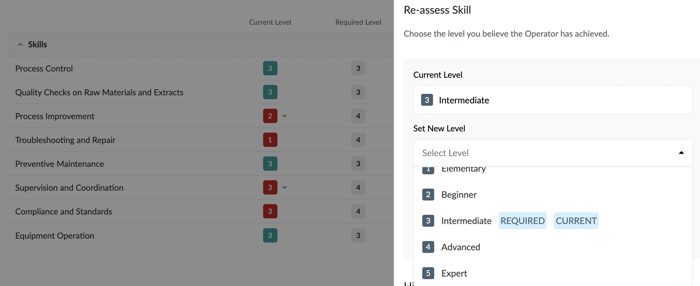
Assigning the relevant skill level is a critical component of a successful training matrix.
2. Assign the skill profile to a team.
Skills management tools need to scale, plain and simple.
A skills management platform should have the capability to assign these skills profiles to any team that performs the task at hand. This way, any production site within an organization can use this framework to train its staff and close skills gaps.
For organizations with global value or distributed value chains, it's especially important that training matrices (and the skills profiles they contain) can be used effortlessly across any sites that share machinery and processes.
3. Managing skills and closing skills gaps.
Training matrices are powerful for two key reasons:
1. They're visual.
A well-made training matrix will allow a supervisor to identify a skills gap or a training opportunity at a glance.
Example: In the visual below, skills gaps for individual skills are marked in red within the matrix - indicating that the employee has not assessed to the required level.
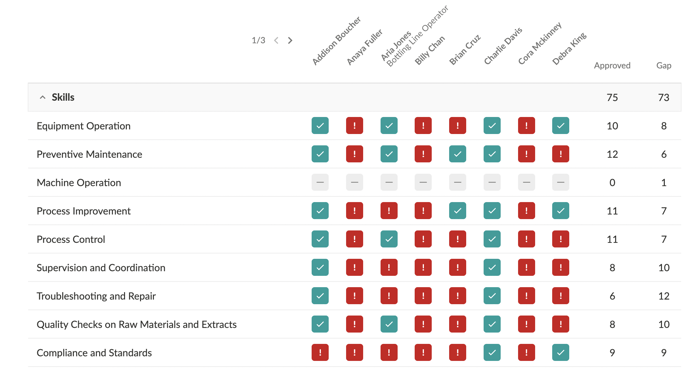
Skills gaps should be immediately identifiable with visual cues. Here they're clearly marked in red.
2. They're personalized.
Digital training matrices allow you to create individualized skills profiles for each and every employee. Here you can track their progress and intervene with relevant opportunities for development.
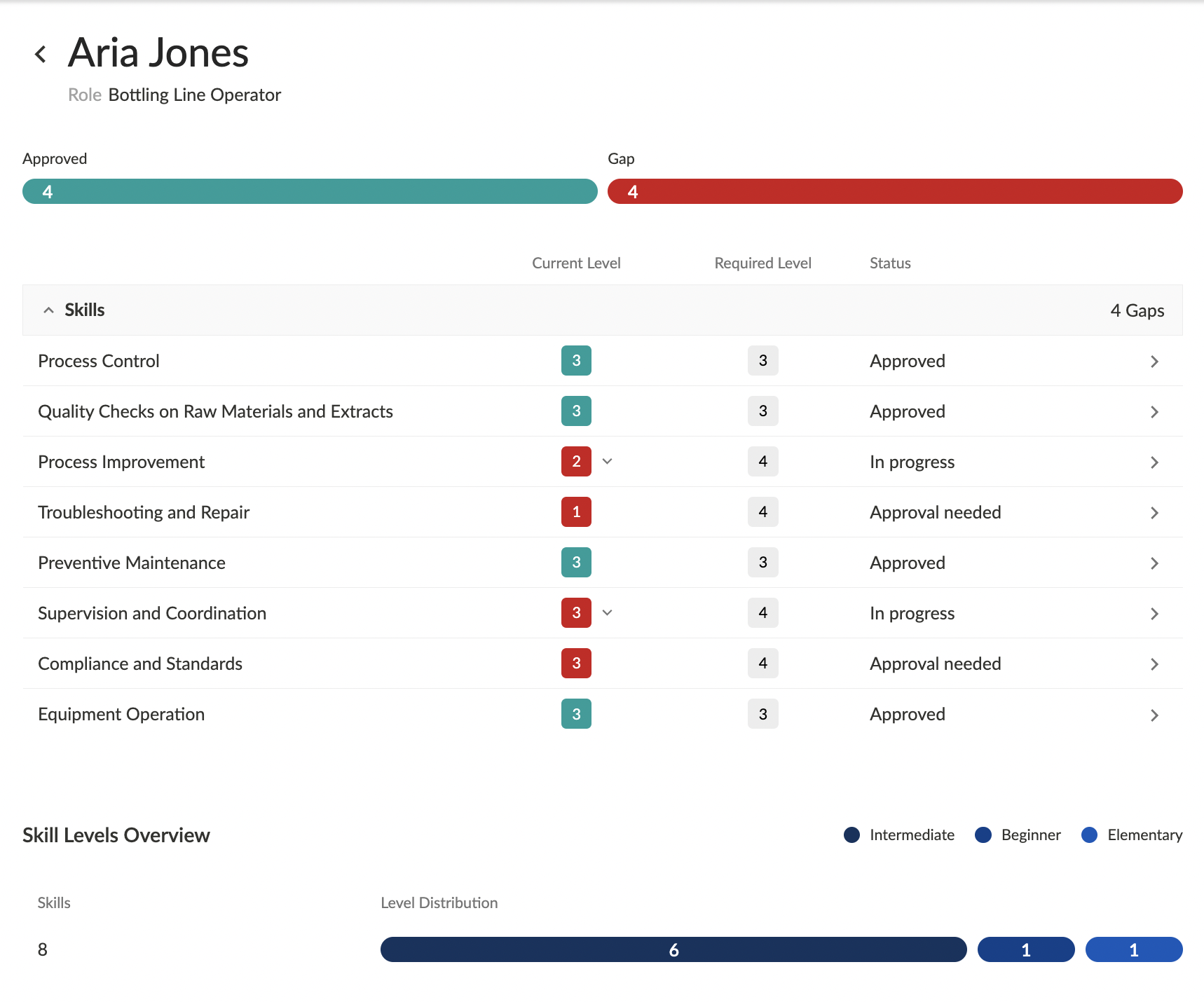
Individualized skills profiles allow you to facilitate more meaningful and practical skills development.
3. They're always up to date.
One of the biggest headaches surrounding training and skills matrices created in excel and other tools - they're nearly impossible to keep consistently up to date. Even if a training manager manages to stay on top of the manual work, it's an incredibly time-intensive process.
A digital training matrix will instantly update according to the data provided by skills assessments - keeping this a dynamic and accurate tool for skills management and development.
Beyond compliance: Driving operational excellence.
A training or skills matrix should actively drive performance on the floor.
Risk mitigation starts with visibility. When gaps are clearly identified, teams can act before they lead to safety incidents or quality issues. That’s how manufacturers protect First Time Right and avoid the hidden costs of rework and scrap.
It also becomes a real-time tool for resource planning. During shift handovers, or when someone calls in sick, managers can instantly see who is qualified to step in, keeping production moving without compromising standards.
Standardization is what makes this scalable. For example, a global matrix ensures that a “Level 3” operator in one facility has the same competencies as a “Level 3” in another. The result is consistency across sites, faster ramp-up, and a more predictable operation overall.
Build a culture of continuous learning.
Transparency is the foundation for creating clarity and momentum across the workforce. When workers can see exactly what skills they need to advance to the next level, expectations are clear. Promotions and raises are tied to demonstrated capability instead of perception. This removes favoritism and builds trust on the shop floor.
That clarity drives employee engagement. When frontline workers understand their growth path and see real investment in their development, they’re more likely to stay, contribute, and take pride in their craftsmanship. Moreover, retention improves because progress feels achievable and recognized.
But this only works if the matrix is alive. It shouldn’t sit as a static dashboard. Used in regular 1-on-1s, it becomes a tool for coaching, feedback, and goal-setting. Managers and operators align on what’s next, close gaps faster, and keep development moving.
Want more skills content?
👉 Here's how to train based on competency, not job titles.
👉 Here's a great free template to help coordinate employee development.
👉 Here's a breakdown of reskilling vs. upskilling (and the importance of each) at the frontline.