



.svg)
 Shop floor execution
 Maintenance
 Production
 Skills
.png?width=60&height=60&name=chart-line-up%20(1).png) Manufacturing Intelligence
Manufacturing Intelligence
 Automotive
 Building materials
 Packaging
 CMMS/EAM
 MES
MES
 Connected Worker
 Manufacturing Intelligence
 Case studies
 Blog
Blog
 Ebooks & Guides
 Webinars
 Events
.svg) OEE Calculator
OEE Calculator
 Downtime Cost Calculator
 About Us
 Partners
 Newsroom
 Support
 Careers
 Trust center


.svg)

A Computerized Maintenance Management System (CMMS) serves as the digital core of industrial maintenance operations. Manufacturing organizations rely on CMMS technology to transition away from reactive firefighting, paper logs, and fragmented spreadsheets toward proactive asset management.
What is CMMS software?
Computerized Maintenance Management System software centralizes maintenance data and automates operational workflows across plant equipment, tooling, and facilities. A CMMS acts as an operational hub where maintenance teams log repairs, track asset histories, organize spare parts cribs, and schedule routine servicing.
By replacing paper clipboards and static spreadsheets with a centralized database, well-built CMMS software provides maintenance managers and plant leaders with real-time visibility into equipment health and technician workload. While enterprise software handles high-level financial tracking, a CMMS functions as the hands-on toolkit inside the broader enterprise toolbox. It gives technicians direct access to the work instructions, history, and parts information required to keep machines running efficiently.

What is a CMMS used for?
Imagine coordinating maintenance for dozens of lines within a plant without a centralized digital solution. This quickly leads to missed service intervals, inventory shortages, and unexpected breakdowns. Industrial plants face this exact challenge on a massive scale.
Manufacturing facilities use a CMMS to structure daily upkeep, organize labor, and prevent costly machine failures across hundreds of connected assets.
- Preventive Maintenance (PM) Scheduling: Launches routine service tasks based on elapsed calendar time or accumulated equipment operating cycles.
- Work Order Management: Standardizes issue reporting, task assignment, repair tracking, and work completion verification.
- Asset History Tracking: Maintains a complete digital log of past equipment breakdowns, part replacements, and technician notes.
- Spare Parts Inventory Control: Monitors crib inventory levels, logs part consumption against specific machines, and flags low-stock reorder points.
- Operational Reporting: Generates performance metrics, maintenance cost breakdowns, and equipment reliability analytics for leadership teams.
How does a CMMS work?
A CMMS operates through a continuous operational feedback loop that connects plant floor events directly to maintenance workflows.
- Asset Registry Setup: Maintenance leaders input equipment details, machine hierarchies, serial numbers, operational locations, and associated bill of materials (BOM) data into the software database.
- Work Order Generation: An operational disruption or pre-scheduled timer triggers a work order. The system routes the request to qualified technicians with attached safety documentation and visual repair guides.
- Preventive Maintenance Scheduling: The system monitors calendar intervals or machine operating metrics, automatically launching scheduled maintenance work orders before component wear causes machine failure.
- Spare Parts Allocation: Technicians remove required replacement components from the crib, and the system automatically updates inventory counts, calculates part costs against the specific machine, and alerts crib managers if stock falls below minimum thresholds.
- Reporting and Analysis: The software logs completed work orders, labor hours, and downtime durations into centralized dashboards, allowing reliability engineers to identify chronic failure patterns and optimize servicing strategies.
Key features of a CMMS
- Work order management: Creates, assigns, tracks, and logs emergency and scheduled repair tasks in real time.
- Preventive maintenance scheduling: Automates routine servicing triggers based on fixed calendar intervals, sensor thresholds, or equipment usage cycles.
- Asset registry: Stores comprehensive equipment documentation, repair records, machine locations, and bill of materials details in a searchable database.
- Spare parts inventory: Tracks part locations, crib stock levels, unit costs, and usage trends while triggering automated restock alerts.
- Reporting and dashboards: Calculates key performance indicators like Mean Time to Repair (MTTR), Mean Time Between Failures (MTBF), and maintenance labor distribution.
- Mobile access: Enables frontline technicians to view tasks, scan asset QR codes, reference digital work instructions, and update work orders directly from mobile devices.
The benefits of a CMMS
From reducing machine downtime (and the associated costs), to improving the lifespan of equipment, to a more cohesive data-driven way of working, a competent CMMS will positively impact almost every aspect of modern manufacturing operations.
Reduced unplanned downtime
Unplanned downtime stalls production lines and drives up operating costs. A CMMS helps maintenance teams transition from reactive repairs to structured preventive servicing. Servicing machinery before components fail dramatically decreases unexpected breakdowns and keeps production throughput steady.
Extended asset lifespan
Industrial machinery represents a major capital investment. Performing routine servicing according to manufacturer specifications prevents excessive mechanical wear and tear. Over time, regular maintenance extends the operational lifespan of heavy equipment and maximizes capital return on investment.
Lower maintenance and inventory Costs
Emergency repairs often require rush shipping for spare parts and excessive technician overtime. A CMMS stabilizes maintenance expenses by organizing planned work around production shifts and right-sizing spare parts inventory to prevent overstocking and costly stockouts.
Regulatory compliance and clear audit trails
Manufacturing plants face strict safety, environmental, and quality audits. Electronic record-keeping inside a CMMS ensures every inspection, safety audit, and equipment repair leaves an accurate time-stamped log, making audit preparation straightforward and verifiable.
Data-driven operational decisions
Relying on tribal knowledge or gut instinct makes long-term plant planning difficult. Centralized reporting provides plant leaders with clear data regarding repair expenses, failure trends, and technician utilization, ensuring maintenance investments target the highest-impact operational needs.
CMMS vs EAM vs ERP
Industrial organizations often evaluate CMMS software alongside Enterprise Asset Management (EAM) platforms and Enterprise Resource Planning (ERP) systems. Each software category fulfills a distinct operational scope within a plant.
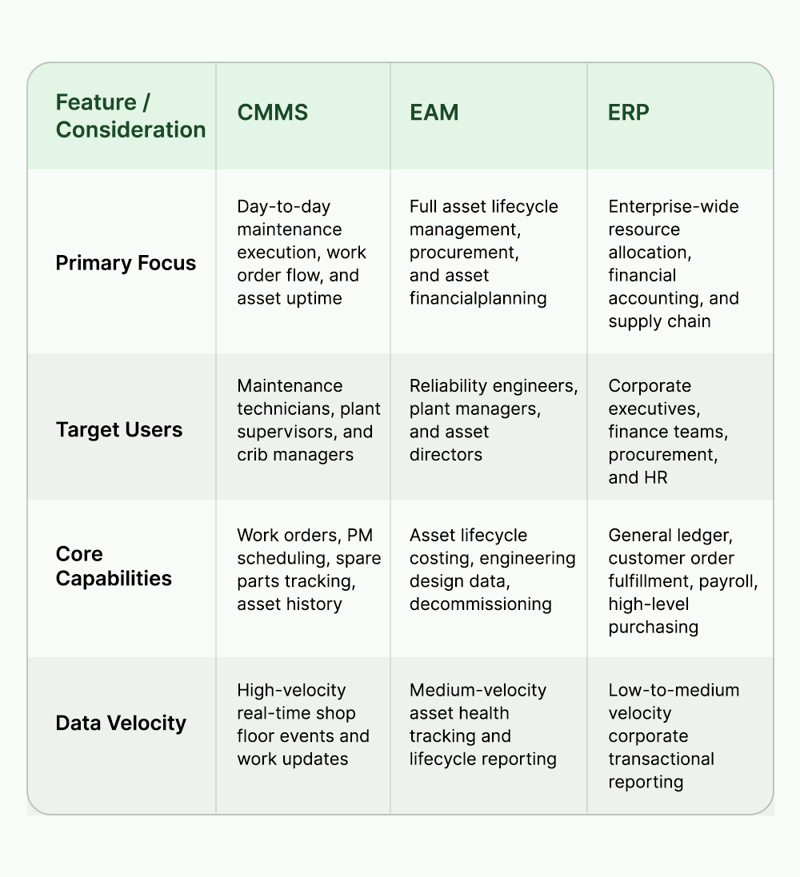
Types of CMMS: cloud vs on-premises
Cloud-based (SaaS) CMMS
Cloud-based systems host software applications and data on secure remote servers managed by the software provider. Maintenance personnel access the platform through web browsers or mobile devices. Updates deploy automatically, initial capital costs remain low, and plant personnel can access operational dashboards from any site location. Cloud systems suit organizations seeking rapid deployment, low IT overhead, and multi-site scalability.
On-premises CMMS
On-premises systems install directly on local servers located physically within a manufacturing facility or corporate data center. Internal IT departments manage system security, hardware maintenance, backup processes, and software updates. Initial setup requires higher upfront capital investments for hardware and licensing. On-premises deployments fit facilities with strict network air-gapping rules or specialized data sovereignty regulations.
How to choose a CMMS
Selecting a CMMS requires evaluating how well software functionality aligns with frontline operational needs and broader enterprise systems. Maintenance and operations leaders evaluating software solutions benefit from examining key criteria:
- Ease of adoption: Frontline adoption dictates software success. Platforms with complex interfaces encourage technicians to default back to paper forms. Modern software prioritizes intuitive design so technicians log work quickly without administrative friction.
- Production and real-time tie-in: Maintenance doesn't occur in a vacuum. Effective software connects maintenance activities directly to live production schedules and line statuses rather than isolating maintenance operations inside a silo.
- Mobile functionality: Technicians perform work at the machine, not behind an office desk. Native mobile capability allows workers to scan equipment QR codes, attach photo documentation, check spare parts availability, and complete work orders directly on the shop floor.
- System integration capabilities: The software must exchange data cleanly with existing ERP, SCADA, and Quality systems to eliminate manual double data entry across departments.
- Rapid implementation Time: Solutions requiring years or extensive custom development delay operational value. Plant teams benefit from platforms designed for rapid rollout and quick time-to-value.
- Ongoing support and training: Evaluating vendor support responsiveness and workforce training resources ensures plant teams receive assistance when scaling the software across additional lines or sites.
Explore how a dedicated manufacturing CMMS platform bridges frontline execution and plant-wide operational performance.
The modern CMMS: from reactive tool to system of action
Traditional CMMS platforms were designed as passive systems of record—digital filing cabinets logging what broke yesterday. While these legacy tools successfully replaced paper work orders, they frequently isolate maintenance data away from the production floor. When maintenance software operates independently from production scheduling, maintenance teams remain trapped in reactive firefighting.
Modern manufacturing operations require moving from passive recording to a system of action.
A modern maintenance platform connects maintenance activities to live line performance, overall equipment effectiveness (OEE), throughput targets, and product quality metrics. Instead of waiting for a machine failure to trigger a manual repair request, connected platforms orchestrate floor activities in real time. When operational anomalies happen, automated dispatches route the correct technician to the exact machine with the necessary parts and digital work instructions before minor stops turn into major downtime events.
This connected operational environment scales performance without requiring expensive rip-and-replace infrastructure overhauls. Advanced intelligence layers built into modern platforms further streamline decision-making through specialized AI tools:
- PM Effectiveness Solver: Audits scheduled maintenance routines to identify whether preventive tasks actively prevent equipment failure or consume labor hours without reducing risk.
- Spares Optimization Solver: Compares inventory levels against actual failure frequencies, right-sizing crib stock to prevent stockouts while reducing excess inventory carrying costs.
- Machine Analysis Solver: Diagnoses chronic failure patterns across specific assets and suggests corrective repair actions based on verified historical fixes.
Connecting maintenance execution directly with shop floor intelligence transforms maintenance operations into a strategic driver of plant availability. Discover how manufacturing intelligence software turns floor data into real-time prescriptive actions, or calculate the financial impact of plant floor disruptions with the Downtime Cost Calculator.
Frequently asked questions about CMMS
What does CMMS stand for?
CMMS stands for Computerized Maintenance Management System. It is specialized software designed to centralize maintenance data, streamline work order tracking, schedule preventive maintenance, and manage spare parts inventory. Organizations use a CMMS to optimize asset performance, reduce unexpected downtime, and maintain digital maintenance records across facilities.
What is a CMMS used for?
A CMMS is used to plan, execute, and track all maintenance activities across an organization. It centralizes preventive maintenance scheduling, work order management, equipment repair histories, spare parts tracking, and operational analytics into a unified hub. This visibility helps maintenance teams prevent equipment breakdowns and control operating costs.
What's the difference between CMMS and EAM?
A CMMS focuses primarily on day-to-day maintenance execution, work order management, and equipment availability on the shop floor. Enterprise Asset Management (EAM) covers the broader lifecycle of assets, including financial accounting, procurement, and risk management. A CMMS acts as the hands-on toolkit inside the broader enterprise EAM toolbox.
How much does CMMS software cost?
CMMS software pricing varies based on deployment type, user counts, facility scale, and required modules. Most modern cloud systems use subscription pricing based on active users or sites. Costs scale with organizational complexity, while implementation services and enterprise integrations are typically quoted custom based on specific facility requirements.
What's the best CMMS for manufacturing?
The best CMMS for manufacturing connects maintenance activities directly to production in real time rather than functioning as an isolated facilities log. It must offer mobile functionality for frontline technicians, integrate seamlessly with existing ERP software, and deliver real-time operational insights that actively reduce unplanned machine downtime.
Want to talk to an expert about implementing a CMMS in your operations? You can start the conversation here.

"What makes L2L so unique is the fact that the product was developed by real manufacturing users. People that truly understand the day-to-day issues and concerns that drive the production floor."
Looking to replace your CMMS?
Contact us!
Read More About CMMS





Their words speak for us.